MattHicks.com

Programming on the Edge

Showing posts with label java. Show all posts

Logging Performance

Published by Matt Hicks under , , , , , , , , , , on Thursday, January 12, 2017
I've never been a fan of the setup of logging frameworks as far back as when I was a Java developer.  The hassle and complexity of configuring and managing the logging framework was always a big hassle and would often create serious problems in the application if not done right.  Even today in Scala it doesn't feel much better.  Certainly we have Macros that give some additional compile-time optimizations, but it's amazing how little has changed.

A while back I created a Scala logging framework called Scribe.  Honestly, the primary reason had more to do with giving greater flexibility to control configuration in code over performance or anything else.  However, by not building on top of log4j, logback, slf4j, or JUL, I found that the system was not only far more simplistic and configurable, but it was also faster.

I recently did a comparison between Lightbend's Scala Logging framework to see how it performs.  Without any additional optimizations the results were pretty impressive.  I configured both Scribe and Scala Logging to avoid writing to standard out as that would be the primary bottleneck of performance and simply wrote a custom Writer / Appender that would simply count the log entries:


Over sixty seconds I recorded how many records could be logged.  Scala Logging was able to log 474k records and Scribe was able to log 610k.  Now, obviously this is far more logging than any reasonable application should be doing, but the point was to prove that not only can Scribe keep up with the most popular Scala logging framework (Scala Logging) on top of the most popular Java logging framework (Logback), but it quite a bit faster.

The second thing I measured was memory consumption over the run.  Memory usage is a very important factor with regard to logging as it should have a very small footprint to give maximum allocation to the application itself.  Again, my finding were pretty strongly in favor of Scribe:

While Scala Logging utilized 704kb of memory Scribe utilized on 596kb.  Again, not a substantial difference when we're discussing hundreds of thousands of records being logged, but this is meant to prove that Scribe is the better performer.

Very often I hear that a developer won't use a framework because there aren't enough developers using it.  Obviously this creates a chicken / egg situation as you can't get developers using it because not enough developers use it.

Hopefully this short post will give some additionally credibility to the value of Scribe that people will start comparing features and see just how much it has to offer.  If there's something missing that your existing logging framework has, just create a ticket.

Mocking should be Mocked

Published by Matt Hicks under , , , , , on Wednesday, February 25, 2015
I've worked with and for a lot of companies over the years and with the ones that actually care about unit testing Mocking (Mockito or some other variation) typically quickly enters the scene. My argument is that in proper coding you should be able to write proper unit tests without any mock objects. I'll go a step further and say that encouraging mocking in your tests actually encourages poor code quality.

What's the purpose of Mocking?

Mocking is extremely common in unit tests, but why?  The basic idea is that you are attempting to test one specific "unit" of functionality, but you don't want calls to the database, third-party calls, or other side-effects creeping into your unit tests. On the surface this seems like a valid use-case.

Why is Mocking bad?

There are many problems related to mocking that I'll try to quickly step through.

Unnecessary Complexity and Decreased Modularity

Though the purpose of mocking is actually to reduce complexity it very often increases the complexity of your unit tests because you often end up with confusing and complicated mocking to avoid running aspects of your code that you don't want executed in your tests.  You often end up pulling your hair out trying to figure out how the internals of the system are supposed to work in order to get the mocks to operate as expected and then all your tests start breaking as soon as that internal logic changes.  You often end up in a scenario where your code works fine because it's written modularly to continue working but your unit tests break because they are essentially implementing the internal functionality via mocks.

Unit tests testing the Mocking framework

In extremely complex unit tests or even simpler unit tests that are managed over a long time or through many developers it becomes more and more confusing what the purpose of the test actually is. I can cite dozens of examples where I've been auditing unit tests only to find out that the unit test does nothing but test the mocking framework instead of the code.

Need for Mocking Represents Bad Code Separation

This is what my entire complaint really boils down to.  If you actually need mocking in your unit tests, your actual code that you're testing is poorly written in the first place.  You should be writing code in proper units to allow individual testing without the need for mocking at all.

For example:


You might have a scenario similar to the code above and you want to test the checkout functionality of your system, but you don't want the payment gateway to be called and you don't want it actually persisting to the database so you might mock those out to avoid those being called. Instead, consider the idea that there are four units of functionality clearly defined in this case:
  1. Validating the Order
  2. Calling the Payment gateway
  3. Persisting the information to the database
  4. Creating a Receipt
Herein lies the problem. You have tight coupling in your code of dissimilar things making mocking necessary. If instead you were to refactor your code to look more like this:


You can see now that each unit of functionality has been broken out into its own method that can be individually tested as needed without the necessity of mocking. Further, the code is significantly cleaner and more maintainable as a result of this refactoring. Not only does it make our unit tests cleaner and easier to maintain without mocks, but it also enforces a higher level of code quality through modularity in your code than was there before.

If you ever decided that the checkout method needed to be unit tested you could refactor it so it takes in a PaymentGateway implementation and Persistance implementation as arguments to avoid side-effects and allowing a test instance to be created to fulfill those needs. Though this is a form of mocking, it follows a better paradigm of consistency and modularity than mocking frameworks do.

As you can see, this is an all-around better way to write code and though it is understood that in existing projects mocking still may be necessary, there is no excuse for such to be necessary in new code.

Nabo TV: Next Generation Media Center

Published by Matt Hicks under , , , , , , on Monday, December 01, 2014
https://www.kickstarter.com/projects/matthicks/nabo-tv-next-generation-media-center

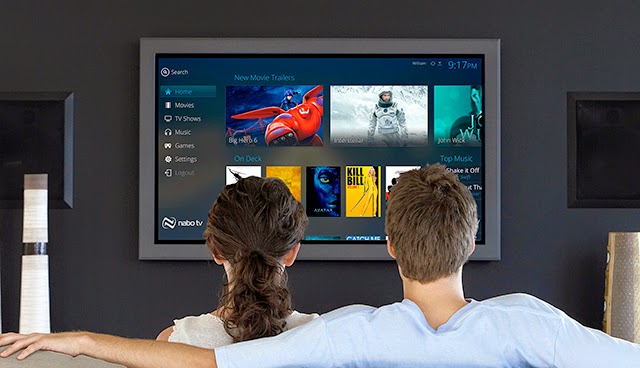
For years media centers, DVRs, and video streaming sites have existed to watch TV and Movies. Over the past several years these services have stagnated. Though there are no shortage of media centers, they all seem to be doing pretty much the exact same thing. For years we have watched and longed for a more featureful interface on our TV to be able to watch the content we're looking for, and for years we have been disappointed.

This is where Nabo TV comes in. We want to bring innovation back to the TV and push the boundaries of what is currently being done on the TV, not just as a product company, but as individuals who enjoy watching media on our TVs.

https://www.kickstarter.com/projects/matthicks/nabo-tv-next-generation-media-center


I just started a Kickstarter to help fund and increase visibility for this endeavor.  Please help me get the word out.

case class Scala

Published by Matt Hicks under , , , , , , , on Tuesday, February 19, 2013

I've been pretty busy the past few weeks with clients and haven't had much time to blog. Last week, however, I gave a presentation to the OKC JUG (Java Users Group) about Scala. As anyone that actually reads my blog must know, Scala is my primary language and I absolutely love it. This week since I don't have a lot of time to delve into anything complex I'll simply share my presentation slides comparing Scala and Java code:

It is amazing how much more simplistic tasks can be accomplished in Scala versus Java.

Hyperscala: Getting Started

Published by Matt Hicks under , , , , , , , , , , on Tuesday, January 15, 2013

Last week I did an introduction to Hyperscala and briefly outlined some really cool things it can do. This week I want to slow down a bit and take you through the basics of getting your first application up and running with Hyperscala.

Requirements: Since there is a broad number of IDEs / editors used for working in Scala I won't make any presumptions in this tutorial regarding an IDE. However, I will quickly say that I use IntelliJ and absolutely love it for Scala development. That being said, the only requirements necessary to begin this tutorial is SBT and your editor of choice.

First we need to create our directory structure:

    hello-hyperscala/
      src/
        main/
          scala/
            hello/
              HelloPage.scala
              HelloSite.scala
      build.sbt

Now lets create our build.sbt file in the hello-hyperscala folder with the following contents:

This is a fairly simplistic build.sbt file with just a few specifics to note. First, we need the Typesafe Repository because one of Hyperscala's dependencies uses Akka Actors. The external repo will not be required once we upgrade to 2.10 but because of some known bugs in 2.10 that undertaking is currently on hold. The second thing to notice is the hyperscala-web dependency. The web sub-project of Hyperscala provides the functionality to create a Website and Webpages. There are several sub-projects in Hyperscala (core, html, javascript, svg, web, ui, examples, and site) but web is the highest level we need and depends on the rest of the functionality we want to use right now.

Next we need to create our actual webpage:

You'll name this HelloPage.scala and put in the hello directory as reflected in the structure above. It's fairly simple what we're doing here. We're extending from Webpage that defines the basic HTML structure (html, head, body) and we can then add content on to it. We set the page title and add "Hello World!" to the body of the page.

Next we need to create a Website. The website is responsible for routing URLs to pages, managing access to the session, and much more. So here's our very basic website:

You'll name this HelloSite.scala and put it in the hello directory with HelloPage.scala. We simply define the val page that represents the URI /hello.html to point to a new HelloPage. The second argument is a function, so every request creates a new instance of HelloPage. We talked about Scope in the previous article but for the purposes of our do-nothing page we just have it create the page, render it, and then die when a request comes in. By default a WebpageResource will automatically add itself to the Website so there's no need to explicitly add it. Lastly, the createSession is responsible for creating a new Session that is used throughout the website across all pages.

Now that we've got all of our code written we simply need to run it. Issue the following command:

You should end up with some output like the following:

Notice the "bound to *:8080" signifies that it is wildcard bound to all IP addresses and on the port of 8080. Now just open up your browser and hit http://localhost:8080/hello.html and you should be greeted with "Hello World!".

Why is Scala more difficult than Java?

Published by Matt Hicks under , , , , , on Wednesday, December 08, 2010
I was pretty exclusively a Java developer for twelve years before making the switch to Scala. Yes, it was difficult to learn some of the syntactical differences, but now that I have I don't want to turn back. No, this is not a baited question to get a flame-war going, but an honest attempt to get some real feedback by those that believe Scala is more difficult than Java.

Let me lay some ground-rules before we get this discussion going though. First, complex topics in Scala are complex, there's no debate there, but that doesn't make Scala more difficult than Java, there are just more possibilities to what you can accomplish. I say that the argument cannot be made that Scala is more complex if there is not a side-by-side comparison to Java code that is much simpler to understand. This means we have to leave the advanced concepts of implicit conversions, multiple inheritance, and so much more that Scala can do, but are features that bring it beyond the capabilities of Java. Yes, of course you can make an argument that in switching to a language like Scala you will eventually run into these scenarios, but I am speaking purely of the introductory programmer and the "difficulties" between Scala's syntax versus Java's.

Now, can someone give me a scenario of code in Java that would be more complicated to understand in Scala?

The Pitfall of Programmer ADD

Published by Matt Hicks under , , , on Tuesday, July 27, 2010
Programmer ADD: The (often external) push to work on many projects at a time rather than focusing on and accomplishing one task at a time.

I currently work for a small company and unfortunately that means I'm constantly being pulled in many directions. There just aren't enough people to do everything, but lately I've started noticing the effect this has had on the quality of work I do. Since I'm constantly pushing to finish up what I'm working on in order to start on the next project on my plate I often don't take the time really necessary to quality check and test the functionality I've added or changed. This results in work that is not as well thought out as it should be, and not as well executed as I would like.

I can definitely point a finger to my boss for pushing the amount of work I have to accomplish in a given time-frame, but realistically even when I've worked for larger companies this has still been more-or-less true of all development work I've done. As developers we're constantly being pushed for deadlines and getting bugs fixed. This might be great from a management perspective on "work accomplished", but I think this really has a negative impact on the company in the long-term as we aren't really given the time necessary to nurture our projects to write solid and well-tested code, but just enough to get the job done. The result? Code that eventually has to be repaired or updated at twice the effort as it would have taken to do it right in the first place.

This is basically just a rant as I see the quality of my work declining as deadlines push me to do more than I can safely accomplish, but it also raises my curiosity if this is something most other developers deal with as well?

Eclipse Helios (3.6 RC4)

Published by Matt Hicks under , , , , , , , on Monday, June 14, 2010
I've been a user of Eclipse for many years now and when I saw there was a free t-shirt to be had by reviewing the newest release there was only one choice to make. :)

The download is exactly the same as all previous releases but the first thing that struck me was the startup time. Granted I have no plugins installed yet, but Eclipse was up in just a few seconds and that already has me excited. Performance has always been the biggest problem in Eclipse and if they've made major strides in that direction I'm a happy camper.

Granted this is RC4, but immediately after downloading and unzipping I checked for updates and it spend the next 5 minutes downloading a pretty large update to the Eclipse SDK and made me restart when it was done. Again, RC4, so lets just hope the actual releases are up-to-date. :)

Installing MercurialEclipse and the Scala plugin went smoothly and I went to pull down Sgine (http://sgine.googlecode.com) and all was fine except Scala can't seem to build the project correctly. My guess is this is a bug in the Scala plugin with Helios.

After spending a bit more time with it I haven't really seen much difference in 3.6 and 3.5 apart from some performance improvements. However, performance alone is a very worthwhile feature.

Still Alive!

Published by Matt Hicks under , , , , , , , , , , on Saturday, May 01, 2010
Well, this is a great title for this post not only as it's the first blog post I've made here in seven months, but I've also had the song from Portal stuck in my head lately. :)

Looking at my blog it would be easy to classify me as MIA but I've actually been quite busy in the open-source and have even been blogging quite a bit lately, just not here, but I'll get to that in a minute.

First of all, my very basic last post talking about the entry-level learning I was doing with Scala was quite fitting as my last post as very shortly after that post I made a complete shift from Java to Scala programming. With this came the abandoning of lots of open-source projects I've either created (like jSeamless) or been a developer on (like jMonkeyEngine). I believe so strongly in Scala that I've shifted everything I possibly can to Scala.

Second, with the shift I've made to Scala and all the projects I've abandoned as a result, one new project has come to being that, in many ways, embodies much of the vision I've had for several projects I've left behind. That project is called "sgine" (Scala Engine). I've been developing on it for a while now and have made some major strides recently and finally wanted to make a re-appearance on my blog to hopefully start posting here again.

Now, at the beginning of this post I said that I've been blogging elsewhere. If you go to http://www.sgine.org you'll see that it's a blog filled up with posts regarding updates to the engine I've been developing. I'm really excited about this project and though many people have accused me of abandoning Java...and realistically that's pretty much what I've done...I haven't a regret for switching to Scala, it's such an incredibly powerful language and has renewed my vigor in programming. For anyone considering looking into a new language I cannot recommend it enough.

Loops in Scala

Published by Matt Hicks under , , , on Thursday, October 01, 2009
Lately I've been learning the ins and outs of the Scala language and I have to say, having programmed in Java for the past several years, that Scala is scratching where I itch. It is a lot to grasp and mind opening, but all-in-all I see Scala as what Java could have evolved to if they would have just been willing to ditch some backwards compatibility and fix some stuff rather than just adding more and more work-arounds.

Anyway, that's not the point of this post. I wanted to post some cool loop examples I've been playing with in Scala.

In Java we have the standard incrementing for-loop:
for (int i = 0; i < 10; i++) {
...
}

In Scala we have something similar, but I believe more elegant:
for (i <- 0 until 10) {
...
}

However, with Java 1.5 we got the enhanced for-loop when we don't care about indexes:
for (String s : listOfStrings) {
...
}

In Scala we do something similar, but with a more consistent syntax:
for (s <- listOfStrings) {
...
}

Or, we can go a step further with Scala since it's a functional language we can get rid of the for loop entirely and use a friendly method available to us called "foreach" and pass each entry to another method:
listOfStrings.foreach(doSomething);

def doSomething(s:String):Unit = {
...
}

To me this is of significant appeal because we don't end up with a bunch of embedded for-loop blocks in our methods we focus more on modular functionality to deal with the results of the iteration instead.

jSeamless 2.0 is Coming!

Published by Matt Hicks under , , , , , , , , , , , , on Thursday, August 13, 2009
From the outside looking in it would appear that jSeamless is all but dead, but if you've been paying attention to SVN commits you'll notice there's been quite a lot of activity for the past several months. I have somewhat abandoned what small community I had with jSeamless 1.0 in an effort to "start over" with what I believe is the next generation of UI development. I know there seem to be more web frameworks these days than there are developers using them, but I believe that jSeamless 2.0 has several things going for it that goes outside the scope of any UI framework available today. I know that's an ambitious statement, and I hope in this post to back it up enough to push the point home.

So, from a high-level, here are a few of the major features to look forward to in jSeamless 2.0:

Properties
As discussed in previous blog entries the plain old java beans ideology is one that does not lend itself to extensibility and re-use, so the introduction of Properties into the UI framework creates some amazing possibilities with surprisingly elegant results.
Binding
Binding is one of those buzz-word features that both Flex and JavaFX boast and one of the major reasons JavaFX claims to need its own language is because binding is just plain ugly in Java. However, in jSeamless, with the use of Properties, to bind the 'x' position of component2 to the 'x' position of component1 this can be accomplished with the following single-line elegant line of code:
component1.location.x.bind(component2.location.x);

Yes, that's all you have to do to get real-time property binding.
OpenGL
One of the biggest reasons jSeamless 1.0 delved into the realm of Flash/Flex was because Swing was so incredibly slow and lacked many of the niceties professional developers have come to expect from their frameworks. OpenGL not only solves this problem, but laughs in the face of any other competing graphical framework as it boasts FPS rates in the thousands when Flash struggles for framerates in the hundreds. OpenGL is by far the fastest graphical API available on all the major operating systems. Beyond the fact it spits on all the competition, it adds complete 3D capabilities to the landscape of capabilities people can utilize in their UIs. I could spend several pages elaborating on the features that OpenGL brings to the table, but the best example is just to look at the capabilities of any modern game.

States
Similar to the States support in Flex, jSeamless introduces a similar, but far more powerful, concept in its framework. There are default states associated with basic components like Button (over, pressed, focused, etc.) but they can be modified, removed, and since they use Property references the activation of a State in one Component can modify the appearance of another Component.

No Effects
Yes, this sounds like a disadvantage rather than an advantage, but through my extensive use of Flex in jSeamless 1.0 it became very evident that Effects in their common state add more complexity and frustration than benefit to any complex application. The primary cause of this is what is known as "effect fighting". This occurs when you have two effects that are attempting to modify the same values on the same component toward different ends. In an environment where you want modularity this can be a common occurrence because you have no way of easily determining whether an effect is currently being enacted on the property you wish to enact an effect on, nor do you have the ability to gracefully handle that scenario. You end up with a component jumping around like it can't really decide where it wants to be on the screen. Beyond that, having to create an instance of an effect per scenario leads to a lot of code and having to monitor different scenarios (effect causing something to change, or a direct modification). Finally, you run the risk of something concurrently simply trying to set the value and it being overridden by an Effect in progress. After careful consideration the decision was made to leave Effects out entirely in favor of a new concept associated with every Property called PropertyAdjusters.

Property Adjusters
PropertyAdjusters, as the previous point states, is the alternative to Effects in jSeamless. This offers a simple, concise, and asynchronously mindful methodology of "adjusting" a property to some target. For example, rather than creating something like a MoveEffect, setting the start and end values, setting a duration, and playing it upon a Component you simply do something like this:
component.location.x.setAdjuster(new EasingPropertyAdjuster(Easing.LINEAR_IN, 5.0f));
component.location.x.set(500.0f);
That will apply an EasingPropertyAdjuster for every time the "set" method is invoked on that Property until the PropertyAdjuster is removed. This allows you to style your animations completely independent of the programmatic changes that happen elsewhere. Also, if you ever want to bypass a PropertyAdjuster you can simply invoke "setNow" on the Property to get you immediately to your destination regardless of any PropertyAdjuster that might be set. What's particularly nice about this is if half-way to 500.0f you make a call "set" passing 100.0f it will smoothly take the change and apply it to the animation in progress thus eliminating effect fighting and reducing the complexity of animations in programmatic UI development.

Easings
Simply put, easings are an algorithm that defines the path from one numeric value to another given a specific length of time. Rather than moving a box from left to right smoothly easings give you the ability to have it bounce into the new location.

For example, Easings simply add a polish to animations to move your application's effects from cheesy to professional. jSeamless supports all easings that Flex currently supports along with the ability to create your own with a simple to use interface to define the algorithm.

JMC Support / Media
If you are not familiar with JMC (Java Media Components) it is because it's not really talked about very often by itself. It is a media framework for Java that allows playing video and audio in many formats (FLV, H264, WMV, etc). Sun has blindly been pushing JavaFX which contains this very awesome new API, but they seem to be doing their best to block people from taking advantage of the functionality without buying into JavaFX lock, stock, and barrel. A few people like myself have spent a lot of time finding ways to make use of JMC in Java without the JavaFX dependencies and I have to say it has been very much worth the effort.

Swing Integration
It would be foolish to assume such a small endeavor like jSeamless could really garner the capabilities of a long-lived UI framework like Swing in the short-run. To that end there has been a lot of work done to provide Swing integration directly in jSeamless so all those custom components your application may need to take advantage of can still be used if you should decide to make the switch.

100% Java Framework
In jSeamless 1.0 the viability of Applets was nil, the ability to use OpenGL in the application was problematic (the whole Security Trust dialog), and the performance of Swing was lacking to put it mildly. All these things led to the decision to use Java on the back-end as a remote controller to a Flex front-end. The developer using jSeamless 1.0 only ever had to write Java code, but everything displayed in a Flex client. This was a cool idea, but in the years since that decision was made Java has come a long way. Applets have had new life breathed into them, Sun is magically trusted (JOGL signed JARs), and the world is our playground with the use of OpenGL. All of this was done in Java 1.6 update 10. It was this release of Java that made me have to rethink the whole concept of Java in the browser and Java on the desktop. jSeamless 2.0 has abandoned any ties to anything but straight Java (excepting of our JNI bindings to OpenGL via JOGL of course).

Scalable UI
With the introduction of OpenGL we now have the ability to define a "working resolution" that is not the same as the actual resolution. What this means is that you define your UI as an 800x600 statically defined UI and via the use of vector graphics (one of the very powerful features of jSeamless) have the content dynamically scale up to much higher resolutions "seamlessly" to the user. To them it appears that the UI was developed specifically for their screen size, but to you the development was much easier as you can utilize static pixel values that will get scaled dynamically to the proper resolution.

FXG and SVG Support
If you've never heard of FXG don't feel bad, it's a new feature Adobe has introduced with the new CS4 versions of their applications. It is designed as an XML-based format to portray vector and raster graphics exactly the same as they appear in Illustrator, Photoshop, etc. What is particularly cool about this is that not only does jSeamless have the ability to import FXG files, but the layer names and vector graphics are kept intact during the import. This means a graphical designer can create elements and name them in Illustrator, export it to FXG, you can then import the FXG file, and access the elements by their names and manipulate them directly.

Though not quite as cool, a still very useful feature is the ability to import SVG paths into jSeamless vector graphics.

Size and Location Support Percentages
A big frustration in Swing layout management has always been the pixel values you must put into location and size to determine where and how large your Component should be. This leads to a lot of boilerplate code to center, right-align, or arbitrarily place a component at a specific position based on percentage rather than pixel.

Flex did a much better job here by defining the ability to size components with a pixel or percentage. However, in jSeamless we're going for something much more powerful. We not only give size pixel and percentage values, we also allow defining of x and y location as pixel or percentages. Beyond that, we define an "alignment" to determine what point the percentage should be snapped to. Take this example:
component.location.x.set("50%");
component.location.x.align.set(HorizontalAlign.CENTER);
This sets the x location of the component to be 50% of it's parents size and then uses the CENTER alignment to make 50% represent where the component's "center" is giving us the ability to perfectly center the component within the parent without any boilerplate code.

Advanced Event System
One of the most powerful features of jSeamless 1.0 was the extremely powerful and flexible event system. It took many of the new concepts introduced in Flex, coupled them with a powerful multi-threaded ideology, and threw in a lot of new concepts nobody else had ever seen before to create what I humbly consider to be the best UI event system ever created. :)

Okay, yes, that's a pretty bold statement, but it's at least the most powerful event system I've ever seen in use anywhere...and I've used a lot of UI frameworks. With jSeamless 2.0 the same system was largely kept, but updated, performance improved significantly, and some additional features were added to hopefully take a great event system to the next level.

I would really like to get into specific details about the event system here, but as this post is already running long I'm going to have to make a special post to talk just about the event system in jSeamless as it's just too broad.

Vector Shapes
I've alluded to this already a few times, but jSeamless 2.0 is very centralized around vector graphics to allow scalable UI development, which is particularly beneficial in a 3D environment as content may scale up or down significantly depending on the current usage and perspective.

Suffice it to say, the support for vector graphics required to fully support the FXG format is a pretty broad range of features.

Fully Thread-Safe UI Framework
One of the major goals of jSeamless all along has been thread-safety. This is one area where Swing has always been a big disappointment. The need to use a SwingUtilities.invokeLater any time you want to make any changes to a component made code ridiculously ugly and frustrating to work with. Further, the single-threaded event system leading to a locked UI thread (by ignorant coders of course) is one of the primarily reasons people still think Swing responsiveness is poor at best. jSeamless 2.0 ran the same potential problems with OpenGL as it is required to be run in a single-thread, but all of jSeamless has been written to be thread-safe and hide any single-threaded functionality that must be handled directly in the OpenGL thread. To that end, we also introduce some very interesting multi-threaded rendering capabilities that allow components to render themselves in separate threads before pushing into the OpenGL stack.


jSeamless Google Code Project:
http://code.google.com/p/jseamless/

jSeamless 2.0 Branch in SVN:
http://jseamless.googlecode.com/svn/framework/branches/2.0/

jSeamless Forum:
http://forum.captiveimagination.com/index.php/board,14.0.html

This is definitely not an exhaustive list of features and functionality that jSeamless 2.0 provides. This is simply the functionality already being provided in the pre-alpha version of the framework. My goal in this post is hopefully to garner some interest and potentially some developers who might be interested in joining the project. The project is coming along quite well, but it is largely developed by a lone developer...me. I can always use another perspective and more help to bring this framework to its logical conclusion.

If you have any interest in joining the jSeamless project please contact me.

Java Delegates in xjava

Published by Matt Hicks under , , , , , , on Tuesday, July 07, 2009
I posted over a year ago about Delegates in Java, and since I kicked off an exploration of the functionality I'm providing in my xjava framework with my previous post I thought I would continue with my newest iteration of the Delegates concept as utilized in xjava.

Until you use a language like Scala or Flex that has full delegate support, you can't really appreciate what it is you're missing. As Java programmers we take it for granted that if we need to do some "work" we usually have to create a Runnable implementation that implements the run() method to do the work we need to do:

Runnable r = new Runnable() {
public void run() {
... do work ...
}
};
passWorkOff(r);

However, in other languages that support Delegates you can pass methods/functions as parameters to methods/functions to simplify this process greatly. Consider the alternative:

public void someMethod() {
passWorkOff(this.doWork);
}

public void doWork() {
... do work ...
}

This minimizes the amount of custom/anonymous classes you must create in order to pass a unit of work off.

Unfortunately in Java this functionality is not (yet) supported. Many people have created work-arounds, generally with Java Reflection, but none can support the elegance of the native delegate support other languages have.

I may be known for my rants, but I won't leave you hanging here with a negative thought of Java, I love the language too much to do that. Besides, I have a framework to promote, so lets get to it. :)

In xjava there is a simple interface Delegate:

public interface Delegate {
public Object invoke(Object ... args) throws Exception;
}

The invoke method takes a varargs of Objects and returns an Object. It's pretty straight and simple, but the out-working of the implementations are what add significant power to this concept.

There are several different implementations, but by far the most used and most powerful is MethodDelegate. In our above example of using delegates in other languages to pass a function, this imlementation fulfills that role with the following call:

MethodDelegate delegate = new MethodDelegate(this, "doWork");
passWorkOff(delegate);

This presumes that the passWorkOff method takes a Delegate as a parameter. Like I said, this isn't as good as native support, but it's pretty simple and although you lose the ability to have compile-time checking that you're referencing a valid method, it will throw an exception at runtime if the method referenced is unable to be found.

MethodDelegate has some extremely powerful features that have been added to make it even more powerful though. One such feature is the ability to mix and match when arguments are applied to the method being invoked. Say you have the following method you want to invoke:

public void doSomething(String name, String address) {
....
}

Now, at creation time of the Delegate you know what "name" is, but in the place you wish to use the delegate you only know the address. See the following:

public void someMethod() {
Delegate d = MethodDelegate.createWithArgs(this, "createEntry", "John Doh");
processAddress(d);
}

public void processAddress(Delegate d) {
String address = "123 Nowhere Rd.";
d.invoke(address);
}

public void createEntry(String name, String address) {
...
}

Notice that at creation time of the Delegate "John Doh" is passed in. This is assigned in the Delegate instance as the first argument to the MethodDelegate. Now, when d.invoke is called in processAddress rather than requiring both name and address just address is necessary to be passed since name has already been assigned.

This makes it incredibly easy to put parameters into the method when you're ready to do so rather than applying everything in one place.

Delegates in xjava also make it easy to abstract away from the underlying way data is being retrieved or being assigned. For example, in the above processAddress method, it simply takes a Delegate and invokes it passing the address to it. If you decided later that you would rather assign this to a field of an object rather than calling a method you would simply replace someMethod with this:

public void someMethod() {
Delegate d = FieldDelegate.get(person, "address");
processAddress(d);
}

This presumes the "person" reference is an object with a String "address" field represented within it. The FieldDelegate doubles for getter and setter since passing a value will apply it to the field and invoking without any arguments will get the value from it.

There are also implementations for CallableDelegate and RunnableDelegate that are self-explanatory.

As seen by the interface for Delegate it is extremely easy to create your own implementations of Delegate for whatever scenario you may want to support and abstract away the details of where and what you are actually accessing and though this isn't as elegant as it could be if Java supported delegates natively, it still provides a very decent mechanism for abstracting and simplifying the process of passable work.

See the xjava project for more information:
http://xjava.googlecode.com

Feel free to look at the source code directly:
http://xjava.googlecode.com/svn/trunk/src/org/xjava/delegates/

The Death of Beans

Published by Matt Hicks under , , , , , , on Wednesday, July 01, 2009
My previous post was more of a rant about the frustrations of Java Beans:

Have Beans been holding us back?

I stated at the end of my post/rant that my next post would be about what I suggest as the viable successor to Java Beans. To that end, I begin my discussion about properties.

Though I would like to claim the idea of properties as all my own invention, I cannot and the concept was even new to me when I first read about them here:

https://bean-properties.dev.java.net/tutorial.html

This is not really a new concept, but rather an attempt in Java to solve the problem other languages like C# and ActionScript solve with encapsulated properties that allow you to make calls like:

object.name = "Something";

Though this would appear to a Java developer as a public field being set to a value, in these languages there is a feature to provide special functions/methods for "set" and "get" of the private field and simplifies getter/setter functionality while maintaining a clean and consistent coding experience.

Unfortunately there is no such functionality built into Java and if you want to provide anything beyond assignment of fields to values you must use methods to accomplish this.

With Java 1.5 comes generics which really for the first time make properties practical without a lot of extending of classes. So take a simple example:

public class MyTest {
private String name;

public String getName() {
return name;
}

public void setName(String name) {
this.name = name;
}
}

Now, this is what it might look like using Properties:

public class MyTest {
public final Property<String> name = new Property<String>(null);
}

Properties have set(T t) and T get() methods that replace getters and setters, so a call to change the value would look like:

myTest.name.set("Testing");

Compared to:

myTest.setName("Testing");

They are about the same amount of actual code. What's great here though is that your Property object could contain much more additional functionality that you otherwise would have to inject yourself. For example if Property had the ability to addPropertyChangeListeners:

myTest.addPropertyChangeListener(myChangeListener);
myTest.name.set("Testing"); // Will now invoke myChangeListener when called

Further, you could have something like NotNullableProperty that extends Property and throws a NullPointerException if you try to call set with a null value:

public class MyTest {
public final NotNullableProperty<String> name = new NotNullableProperty<String>("");
}

Now a call to:

myTest.name.set(null);

Will throw a NPE and thus remove the need for you to ever have to check if "name" is null. This hopefully gives a slight grasp of the benefits this begins to provide.

Now, I mentioned above the article that really got me thinking this direction, but ultimately decided to write my own Property implementation because of some of the limitations and performance problems I saw with that implementation. Further, I had a lot of additional features I wanted to provide myself...and am often accused of wanting to write everything myself anyway. :)

This post isn't meant to push people to use a specific Property API but just to consider the methodology change even if they decide to write their own. After all, it only takes a few lines of code to create the base for your own Property class:

public class Property<T> {
private T t;

public T get() {
return t;
}

public void set(T t) {
this.t = t;
}
}

From there you can add any desired functionality: property bindings, value validation, property change listeners, observer/observable functionality, null checks, etc.

Though I don't want to push anyone to necessarily use a specific API, I will give reference to my own Property API for anyone interested in using it as it provides a great deal of functionality and I'm heavily using it in nearly all new programming projects these days and it supports filtering, change notification, property delegates, binding, read-only, adjusters, and much more. It is part of my xjava project:

http://xjava.googlecode.com

To see the source code for my Property API in SVN:
http://xjava.googlecode.com/svn/trunk/src/org/xjava/bean/properties/

Have Beans been holding us back?

Published by Matt Hicks under , , , , , , on Tuesday, June 30, 2009
I have been a Java developer for many years now and have always taken for granted some of the standards pushed on me from the beginning. Java standards such as basic Java Beans (aka POJOs) are supposed to make life easier by providing simple getters/setters that work with the private fields of your Object. For years I have neglected to challenge this as it seemed perfectly natural, and when I started to use Eclipse and could simply tell Eclipse to generate the getters and setters for my beans for me it made it that much easier to simply ignore all the extra code being created.

Unfortunately, over the years there have been some additional frustrations that have resulted from this approach as I wrote more code and attempted to do more complex things in my projects. As a developer trying to write more efficient and more elegant code these things have been a constant reminder that no language nor methodology is ever perfect.

The first frustration which I found myself struggling with as a new developer not using an IDE (that happily writes code for me) is the many lines of code to simply modify a variable. For example:


public class SimpleBean {
private String name;

public String getName() {
return name;
}

public void setName(String name) {
this.name = name;
}
}


Notice that it takes up seven lines of actual code put a simple String into my bean and that's not counting the whitespace added to "pretty it up". Sure, as a noob coder it's tempting to do something like this:


public class SimpleBean {
public String name;
}


and be done with it. However, as a serious developer that's really not practical as it creates additional problems down the road when you want to add validation, remove the setter so it's a read-only field, notify something internally when the value changes, etc.

The next frustration I have with Java Beans is the fact absolutely EVERYTHING is a manual coding exercise. Take Java's Observer/Observable pattern for example. When I was beginning to learn Java I ran into the problem that I wanted to be notified when a value changed in one of my beans and stumbled upon a Observer/Observable tutorial and at first glance I thought, "Wow, this is really great and exactly what I want", until I realized in amazement they expect me to extend Observable and add an additional line of code to EVERY SINGLE setter call that I want to monitor. Come on, I was looking for abstraction to keep my beans dumb and simple, I don't want to add a bunch of extra lines of code to every method. Also, what if I'm already extending another class that I can't change? I'm sure many people might read this and think I'm just being nitpicky, and yes, I am, but I care a great deal about elegance in code and I was hoping for some sort of feature on my Field to "addChangeListener(...)" or something. Besides, every additional line of code is an added line that has to be filtered through when trying to read and debug and thus makes your code more error-prone and harder to manage.

Extending upon the previous frustration is bindings. There have been many a rant on the topic of bindings in Java and though there are many APIs and even a JSR set to solve the problem I have yet to see one do a good job. I myself tried to solve this with my MagicBeans project. There were many iterations of it, but the most elegant required AspectJ to monitor pointcuts on setter methods and notified listeners. It was a complete and elegant abstraction, but required your projects to be compiled with AspectJ which ultimately I abandoned as not worth the added pain.

Ultimately the Java Bean paradigm raises issues primarily in its requirement of the onus being on the developer to write any and all functionality. It disallows you to easily extend or reuse functionality in an Object-Oriented way because they are methods with statically typed fields they represent and though you can accomplish everything you might need to with beans they require a much greater commitment to custom code than should otherwise be expected of the developer in my opinion.

It is these things that have led me to believe there's a better solution, and I've settled on what I believe is the better choice, to which I will explain in-depth in my next post. :)

Java Media Components (JMC) in Swing

Published by Matt Hicks under , , , , , on Sunday, May 03, 2009
If you're like me and have been really excited by all the hype of JMC, but think of yourself as a Java developer and not a fly being beckoned to the newest scripting framework with its bright and illuminating glow (JavaFX that is) then JMC comes as something of a disappointment. After all, every article on the web referencing JMC seems to inseparably link JavaFX and JMC as if they absolutely *MUST* go together.

However, this is not the case. I've blogged before about the evils of JavaFX and how Java developers can leverage the functionality without selling your soul to the scripting demons:

http://www.matthicks.com/2009/02/i-hate-javafx-i-love-javafx.html

Someone else has taken this another step by taking the same approach for JMC:

http://nishimotz.com/2009/03/10/using-jmc-from-java/

Now, though what Takuya wrote is fully functional, I hate the idea of having to include JavaFX just to use JMC. After a bit of digging I have come to find what seems to be a hidden feature (maybe Sun just thinks the idea of someone using it outside of JavaFX is ridiculous and not worth mentioning?), the jmc.jar file you get with JavaFX has some interesting classes in it that you can take advantage of in your own Swing applications without any hackery at all:


package test;

import java.io.File;

import javax.swing.JFrame;

import com.sun.media.jmc.JMediaPlayer;

public class TestJMC {
public static void main(String[] args) throws Exception {
JFrame frame = new JFrame("Testing JMC"); {
frame.setDefaultCloseOperation(JFrame.EXIT_ON_CLOSE);
frame.setSize(800, 600);

JMediaPlayer player = new JMediaPlayer(new File("trailer_1080p.mov").toURI()); {
frame.add(player);
}

frame.setVisible(true);
}
}
}


I hate it when people give references like this and don't give any mention of a test file that can be used along with it, so to let you know what I used, I simply grabbed the trailer for "Big Buck Bunny" here:

http://www.bigbuckbunny.org/index.php/trailer-page/

What's awesome is that any one of them should work fine. Now, the player controls kind of suck, but in that same package there are other, probably more useful Swing classes: JMediaPane and JMediaView.

One last note. You need to include the jmc.dll (or the correct native lib for your OS) file in your library path to be able to play or you'll get unfriendly errors.

Have fun being able to leverage full video playing in your Swing applications.

I Hate JavaFX; I Love JavaFX!

Published by Matt Hicks under , , , , , on Friday, February 27, 2009
I've posted a few places and gotten into more than a few rants publicly about how awful I think it is that Sun has been pushing JavaFX to the Java community. This has not been based on what JavaFX provides, because I think that's absolutely spectacular, but rather that they created a whole new language (JavaFX Script) that they force you into using rather than Java code itself. I've heard all the well reasoned arguments for why this is from the binding support to simplified UI design concepts, but as a professional ActionScript developer as well as a professional Java developer, I believe that using a language that stinks of ActionScript is a major step backwards for the Java community. However, like I said, JavaFX has done an absolutely wonderful job of adding to the UI power of the Java arsenal though, and I want to use it. Since I know that the JavaFX Script compiles into Java byte-code, I knew there had to be some level of access to the underlying API structure directly from Java, but nobody seems to know how or where to do it. After quite a bit of digging I stumbled upon these two pages:

http://blogs.sun.com/javafx/entry/how_to_use_javafx_in

http://forums.sun.com/thread.jspa?threadID=5354921&tstart=1

They looked pretty ugly to me, but put me on the track to actually using JavaFX directly in Java without scripting. I sort of combined those two together to come up with what I think is a little bit more concise example:


package test;

import java.awt.BorderLayout;

import javax.swing.JFrame;
import javax.swing.JPanel;

import com.sun.scenario.scenegraph.JSGPanel;
import com.sun.scenario.scenegraph.SGNode;

import javafx.scene.Group;
import javafx.scene.paint.Color;
import javafx.scene.shape.Rectangle;
import javafx.scene.text.Text;

public class TestJFX {
public static void main(String[] args) throws Exception {
Group group = new Group(); {
}
Rectangle rect = new Rectangle(); {
rect.$width.setAsFloat(200.0f);
rect.$height.setAsFloat(200.0f);
rect.$fill.set(Color.$BLUE);
}
Text text = new Text(); {
text.$x.setAsFloat(20.0f);
text.$y.setAsFloat(20.0f);
text.$content.set("Greetings Earthling!");
text.$fill.set(Color.$WHITE);
}
group.$content.insert(rect);
group.$content.insert(text);
SGNode node = group.getSGGroup();
JSGPanel sgPanel = new JSGPanel();
sgPanel.setScene(node);

JPanel panel = new JPanel();
panel.setLayout(new BorderLayout());
panel.add(sgPanel, BorderLayout.CENTER);

JFrame frame = new JFrame("Test JavaFX");
frame.setDefaultCloseOperation(JFrame.EXIT_ON_CLOSE);
frame.add(panel);
frame.setSize(800, 600);
frame.setVisible(true);
}
}


This isn't the prettiest or most efficient way to code, but it's a start. Next I decided that I'd like to reproduce the Clock example that JavaFX shows here:

http://java.sun.com/javafx/1/tutorials/build-javafx-nb-app/

This gave me a much more practical run through JavaFX from the programmatic perspective and allowed me to verify that it is in fact possible to write a complete application using Java making calls to JavaFX:


package test;

import java.awt.BorderLayout;
import java.io.IOException;
import java.util.Calendar;

import javax.imageio.ImageIO;
import javax.swing.JFrame;
import javax.swing.JPanel;

import com.sun.javafx.functions.Function0;
import com.sun.javafx.runtime.location.FloatBindingExpression;
import com.sun.javafx.runtime.location.FloatVariable;
import com.sun.scenario.scenegraph.JSGPanel;
import com.sun.scenario.scenegraph.SGNode;

import javafx.animation.KeyFrame;
import javafx.animation.Timeline;
import javafx.lang.Duration;
import javafx.scene.Group;
import javafx.scene.image.Image;
import javafx.scene.image.ImageView;
import javafx.scene.paint.Color;
import javafx.scene.shape.ArcTo;
import javafx.scene.shape.Circle;
import javafx.scene.shape.Line;
import javafx.scene.shape.LineTo;
import javafx.scene.shape.MoveTo;
import javafx.scene.shape.Path;
import javafx.scene.text.Font;
import javafx.scene.text.Text;
import javafx.scene.transform.Rotate;
import javafx.scene.transform.Translate;

/**
* @author Matt Hicks (matt@matthicks.com)
*/
public class Clock {
private float radius;
private float centerX;
private float centerY;

private Calendar calendar;
private int hours;
private int minutes;
private int seconds;

private FloatVariable hoursVariable;
private FloatVariable minutesVariable;
private FloatVariable secondsVariable;

public Clock() throws IOException {
// Initial setup
calendar = Calendar.getInstance();
radius = 77;
centerX = 144;
centerY = 144;

nextTick();

// Build JavaFX clock
Group group = new Group(); {
ImageView imageView = new ImageView(); {
Image image = new Image(); {
image.$bufferedImage.set(ImageIO.read(getClass().getClassLoader().getResource("resource/clock_background.png")));
}
imageView.$image.set(image);

group.$content.insert(imageView);
}

Group face = new Group(); {
Translate translate = new Translate(); {
translate.$x.setAsFloat(centerX);
translate.$y.setAsFloat(centerY);
}
face.$transforms.insert(translate);

// Every third hour
for (int i = 3; i <= 12; i += 3) {
Text text = new Text(); {
translate = new Translate(); {
translate.$x.setAsFloat(-5.0f);
translate.$y.setAsFloat(5.0f);
}
text.$transforms.insert(translate);

text.$font.set(Font.font("Arial", 16));

text.$x.setAsFloat(radius * ((i + 0) % 2 * (2 - i / 3)));
text.$y.setAsFloat(radius * ((i + 1) % 2 * (3 - i / 3)));
text.$content.set(String.valueOf(i));
}
face.$content.insert(text);
}

// Black circle for the rest of the hours
for (int i = 1; i < 12; i++) {
if (i % 3 == 0) {
continue; // Don't show a circle on every third hour
}

Circle circle = new Circle(); {
Rotate rotate = new Rotate(); {
rotate.$angle.setAsFloat(30.0f * i);
}
circle.$transforms.insert(rotate);
circle.$centerX.setAsFloat(radius);
circle.$radius.setAsFloat(3.0f);
circle.$fill.set(Color.$BLACK);
}
face.$content.insert(circle);
}

// Center circles
Circle circle = new Circle(); {
circle.$radius.setAsFloat(5.0f);
circle.$fill.set(Color.$DARKRED);
}
face.$content.insert(circle);
circle = new Circle(); {
circle.$radius.setAsFloat(3.0f);
circle.$fill.set(Color.$RED);
}
face.$content.insert(circle);

// Second hand
Line line = new Line(); {
Rotate rotate = new Rotate(); {
FloatBindingExpression exp = new FloatBindingExpression() {
public float computeValue() {
return seconds * 6;
}
};
secondsVariable = FloatVariable.make(exp);
rotate.$angle.bind(false, secondsVariable);
}
line.$transforms.insert(rotate);

line.$endY.setAsFloat(-radius - 3.0f);
line.$strokeWidth.setAsFloat(2.0f);
line.$stroke.set(Color.$RED);
}
face.$content.insert(line);

// Hour hand
Path path = new Path(); {
Rotate rotate = new Rotate(); {
FloatBindingExpression exp = new FloatBindingExpression() {
public float computeValue() {
return (hours + minutes / 60) * 30 - 90;
}
};
hoursVariable = FloatVariable.make(exp);
rotate.$angle.bind(false, hoursVariable);
}
path.$transforms.insert(rotate);

path.$fill.set(Color.$BLACK);

MoveTo e1 = new MoveTo(); {
e1.$x.setAsFloat(4.0f);
e1.$y.setAsFloat(4.0f);
}
path.$elements.insert(e1);
ArcTo e2 = new ArcTo(); {
e2.$x.setAsFloat(4.0f);
e2.$y.setAsFloat(-4.0f);
e2.$radiusX.setAsFloat(1.0f);
e2.$radiusY.setAsFloat(1.0f);
}
path.$elements.insert(e2);
LineTo e3 = new LineTo(); {
e3.$x.setAsFloat(radius - 15.0f);
e3.$y.setAsFloat(0.0f);
}
path.$elements.insert(e3);
}
face.$content.insert(path);

// Minute hand
path = new Path(); {
Rotate rotate = new Rotate(); {
FloatBindingExpression exp = new FloatBindingExpression() {
public float computeValue() {
return minutes * 6 - 90;
}
};
minutesVariable = FloatVariable.make(exp);
rotate.$angle.bind(false, minutesVariable);
}
path.$transforms.insert(rotate);

path.$fill.set(Color.$BLACK);

MoveTo e1 = new MoveTo(); {
e1.$x.setAsFloat(4.0f);
e1.$y.setAsFloat(4.0f);
}
path.$elements.insert(e1);
ArcTo e2 = new ArcTo(); {
e2.$x.setAsFloat(4.0f);
e2.$y.setAsFloat(-4.0f);
e2.$radiusX.setAsFloat(1.0f);
e2.$radiusY.setAsFloat(1.0f);
}
path.$elements.insert(e2);
LineTo e3 = new LineTo(); {
e3.$x.setAsFloat(radius);
e3.$y.setAsFloat(0.0f);
}
path.$elements.insert(e3);
}
face.$content.insert(path);

group.$content.insert(face);
}
}

Timeline timeline = new Timeline(); {
timeline.$repeatCount.setAsFloat(Timeline.$INDEFINITE);

KeyFrame kf = new KeyFrame(); {
kf.$time.set(Duration.valueOf(1000.0f));
kf.$canSkip.set(true);
kf.$action.set(new Function0() {
public Void invoke() {
nextTick();
return null;
}
});
}
timeline.$keyFrames.insert(kf);
}

// Display in Swing
SGNode node = group.getSGGroup();
JSGPanel sgPanel = new JSGPanel();
sgPanel.setScene(node);

JPanel panel = new JPanel();
panel.setLayout(new BorderLayout());
panel.add(sgPanel, BorderLayout.CENTER);

JFrame frame = new JFrame("JavaFX Clock Example");
frame.setDefaultCloseOperation(JFrame.EXIT_ON_CLOSE);
frame.add(panel);
frame.setSize(800, 600);
frame.setVisible(true);

timeline.play();
}

public void nextTick() {
calendar.setTimeInMillis(System.currentTimeMillis());
seconds = calendar.get(Calendar.SECOND);
minutes = calendar.get(Calendar.MINUTE);
hours = calendar.get(Calendar.HOUR_OF_DAY);

if (secondsVariable != null) {
secondsVariable.invalidate();
minutesVariable.invalidate();
hoursVariable.invalidate();
}
}

public static void main(String[] args) throws Exception {
new Clock();
}
}


Now, I did make some slight alterations as the original example uses java.util.Date calls that are deprecated, so I updated to using Calendar instead. Also, I had a little trouble with the binding functionality and had to make calls to invalidate in the nextTick() method. Other than that I stayed quite true to the example and the code works quite nicely.

This is the first step in what I'm ultimately planning as a wrapper around Swing and JavaFX to make more powerful UIs without using a crappy scripting language. :)

See this re-output as an Applet:
http://captiveimagination.com/download/clock/clock.html

Java Delegates

Published by Matt Hicks under , , , , on Tuesday, July 01, 2008
If you're searching the internet for the title of this post you'll see a lot of people ranting about how Java doesn't have Delegate support. Though I have been one of these people, and continue to be frustrated that there is no native solution, that is not the purpose of this post.

I write this to say I've created what I would consider to be a pretty clean alternative to native delegates in Java using reflection. I created this as a feature in jSeamless and have been using it heavily for a while, but after a few people asking about support in non-jSeamless applications for my friendly Delegate support I decided I would remove it from jSeamless and make it a stand-alone API that anyone can use.

The Delegate implementation I find myself using more than anything else is MethodDelegate. It provides the ability to reference a specific method on a specific object that can be invoked. For example:

Some Rules Can't Be Broken

Published by Matt Hicks under , , on Wednesday, May 28, 2008
I'm a big lover of Reflection in Java. It's extremely powerful and lets you do things that technically shouldn't be allowed. For example, an Object with a private method cannot be invoked outside of that method by virtue of the "private" keyword. However, if you use reflection:

public class MyObject {
private void doSomethingHidden() {
System.out.println("I'm hidden and can't be invoked!");
}
}


public class Test {
public static void main(String[] args) throws Exception {
MyObject o = new MyObject();

Method method = MyObject.class.getDeclaredMethod("doSomethingHidden");
method.setAccessible(true);
method.invoke(b, new Object[0]);
}
}


You can invoke the method by setting accessible to true.

I was attempting to do a similar breaking of rules to try to invoke the underlying method of an overridden class:

public class ObjectA {
public void doSomething() {
System.out.println("I'm ObjectA!");
}
}


public class ObjectB extends ObjectA {
public void doSomething() {
System.out.println("I'm ObjectB! Yay!");
}
}


import java.lang.reflect.Method;

public class Test {
public static void main(String[] args) throws Exception {
ObjectB b = new ObjectB();
b.doSomething();

Method method = ObjectA.class.getDeclaredMethod("doSomething");
method.invoke(b, new Object[0]);
}
}


Unfortunately this always invokes the overridden implementation instead. It's a shame the only way to do this is via super.doSomething() from within the overriding Class. Oh well, I guess it's best that you can't do it as it would be a blatant violation of the intentions of Object overriding.

Fastest Deep Cloning

Published by Matt Hicks under , , on Thursday, May 22, 2008
I recently needed to do deep cloning of my Java objects and began to do the old-school style I've used for years: Use ObjectOutputStream and ObjectInputStream to do a "poor-boys" deep clone. However, the performance of this on large Objects is absolutely awful not to mention the amount of memory and CPU it takes to accomplish this. Even if I could get past all of that, the fact that every single Object in the chain MUST implement Serializable just pushed me over the edge...

I thought to myself, "Surely someone else realizes how dumb this is and has a better solution that having to implement Cloneable on everything", but alas, searching online didn't return much other than explanations how to use Serialization to do deep cloning and a little tutorial on increasing the performance on Serialization cloning:

http://javatechniques.com/blog/faster-deep-copies-of-java-objects/

I found that interesting, but it really didn't provide that great of a performance gain, and still didn't overcome the other issues, so I set out to make a rounder wheel. Perhaps it's the years of Reflection I've got hammered into me, or just the fact I think Reflection is awesome, but I turned to my old friend for a faster solution. It really is ironic, since so many people refuse to use Reflection because of performance reasons that I would turn to Reflection to increase performance, but lets see how this goes. :)

So, I took the benchmark test that is referenced in the article above and decided to apply it to my own test using Reflection and see the performance difference. The difference is staggering. After modifying the benchmark to do better timing (System.nanoTime instead of System.currentTimeMillis and a couple other tweaks) I bumped up the iterations to 100 and got the following results:

Unoptimized time (standard Serialization): 13,518 milliseconds

Optimized time (the tutorial Serialization): 12,941 milliseconds

Reflection time (my happy little test): 139 milliseconds

Yes, I did expect the performance to increase, but about 100 times faster is a startling increase in performance. So I bumped up the test another digit to see how well it scaled:

Unoptimized time (standard Serialization): 125,754 milliseconds

Optimized time (the tutorial Serialization): 121,434 milliseconds

Reflection time (my happy little test): 1,359 milliseconds

Okay, this seems to scale at least as well as the alternative and doesn't require the objects to be Serializable. The only problem is that there is substantially more code involved to make this work well since there are peculiarities with certain objects (arrays, Maps, etc.) that have to be explicitly handled. To deal with this scenario I created an interface, "Cloner" that has a simple method:

public Object deepClone(Object original, Map<Object, Object> cache) throws Exception;

This is relatively self-explanatory, but the "cache" map is the only really complex part. This is necessary in order to handle cyclical references (ex. ObjectA contains ObjectB that contains a reference back to ObjectA) that would otherwise cause an endless loop until either memory is exhausted, or more commonly the case, a StackOverflowException is thrown. Upon instantiation of an Object I immediately assign the original Object as the key in the cache and the cloned Object as the value in the cache. I check at the beginning of cloning of each Object if a cache reference already exists and if so I re-use that.

The Cloner instances are pre-defined in the CloneUtilities Class in a static Map<Class<?>, Cloner>. This not only abstracts the implementation details of cloning per specific case, but also allow extensibility for anyone that needs to handle special Objects in their own cloning scenarios.

If you're interested in seeing the final results of this, I have added it to my jCommon project so anyone can use it:

http://commonj.googlecode.com/svn/trunk/src/org/jcommon/clone/

I've included several cloning options in the CloneUtilities Class to allow testing between different options. However, it would seem that reflection is significantly faster than any other known alternative (apart from explicitly writing Clonable support in your Objects and providing some extra functionality for deep cloning). There is still a lot to add to this in the long-run, but I believe this is a good start.

Please drop me some feedback if you have any standard Cloner implementations to add.

EDIT: This post has received a lot of traffic and the jcommon project is no longer being hosted at the referenced URL, it can be found here: jcommon on googlecode. You can also find a newer yet less complete version of this in the xjava project: clone package

Myth Assistant

Published by Matt Hicks under , , , , , on Monday, March 17, 2008
Though I actually wrote this a couple years ago I finally decided to contribute this utility back to the community. This tool allows a graphical remote connection to a MythTV database and can copy and delete recordings over a Samba share. It is a graphical utility written in Java to search recordings, see details of recordings, copy single and batches of recordings, and other features for remote access to recorded programs. This should work on Windows, Mac, and Linux. Hopefully other people can get as much use out of this tool as I have. Feel free to post a comment if you found this useful.

Screenshot of MythAssistant

MythAssistant.jar

MythAssistant.exe

MythAssistant-source.jar